.png)
Fixing Blurry or Low Quality Images in Sections
Image looks soft or pixelated in a section? It is almost always the uploaded file, not the section. Here is how to get sharp images everywhere.
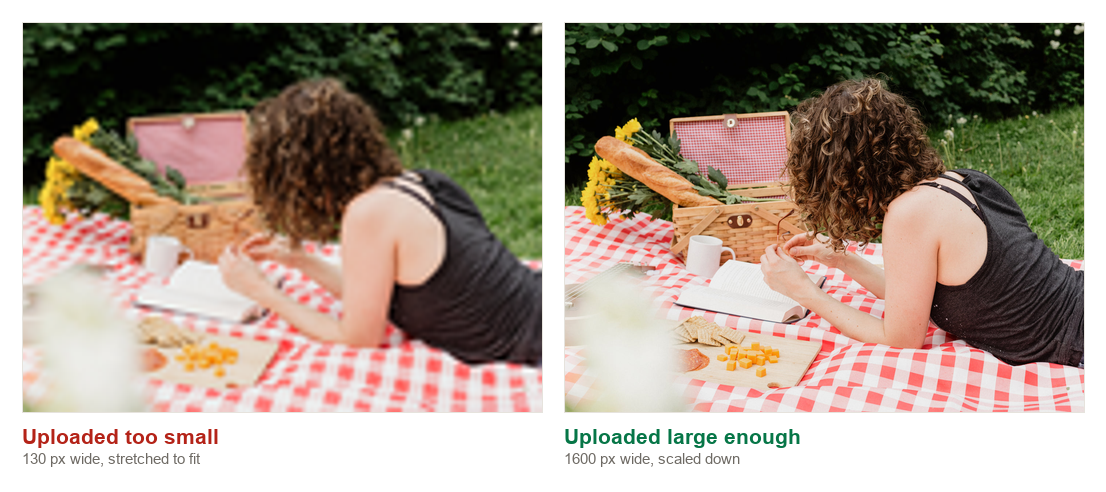
Upload big enough
Screens today are dense, so files need to be larger than the space they fill. Rules of thumb:
- Full width banners: 2400 pixels wide or more
- Half width images and cards: at least 1200 pixels wide
- Logos and small icons: at least 2 times their displayed size
Shopify compresses and serves the right size per device automatically. A big upload does not slow your store down, but a small upload can never become sharp.
Check the source file
If the file already looks soft when you open it full size on your computer, the section will show that same softness. Re export from the original photo or design tool at a larger size.
Mind the crop
A very wide photo squeezed into a tall narrow card gets scaled up to fill the height, which costs sharpness. Pick an image shaped roughly like the space, or use the section's aspect ratio setting if it has one.
Still fuzzy after a bigger upload? Email daniel@section.store or help@section.store with the page link and we will take a look.